Web scraping, extracting data from websites using automated tools, is a powerful way to gather valuable information quickly and efficiently. Understanding how to scrape a website properly is crucial to avoid legal and ethical issues. Misusing web scraping can cause significant consequences, as seen in cases like Cambridge Analytica and Clearview AI, which faced criticism for scraping user data without consent.
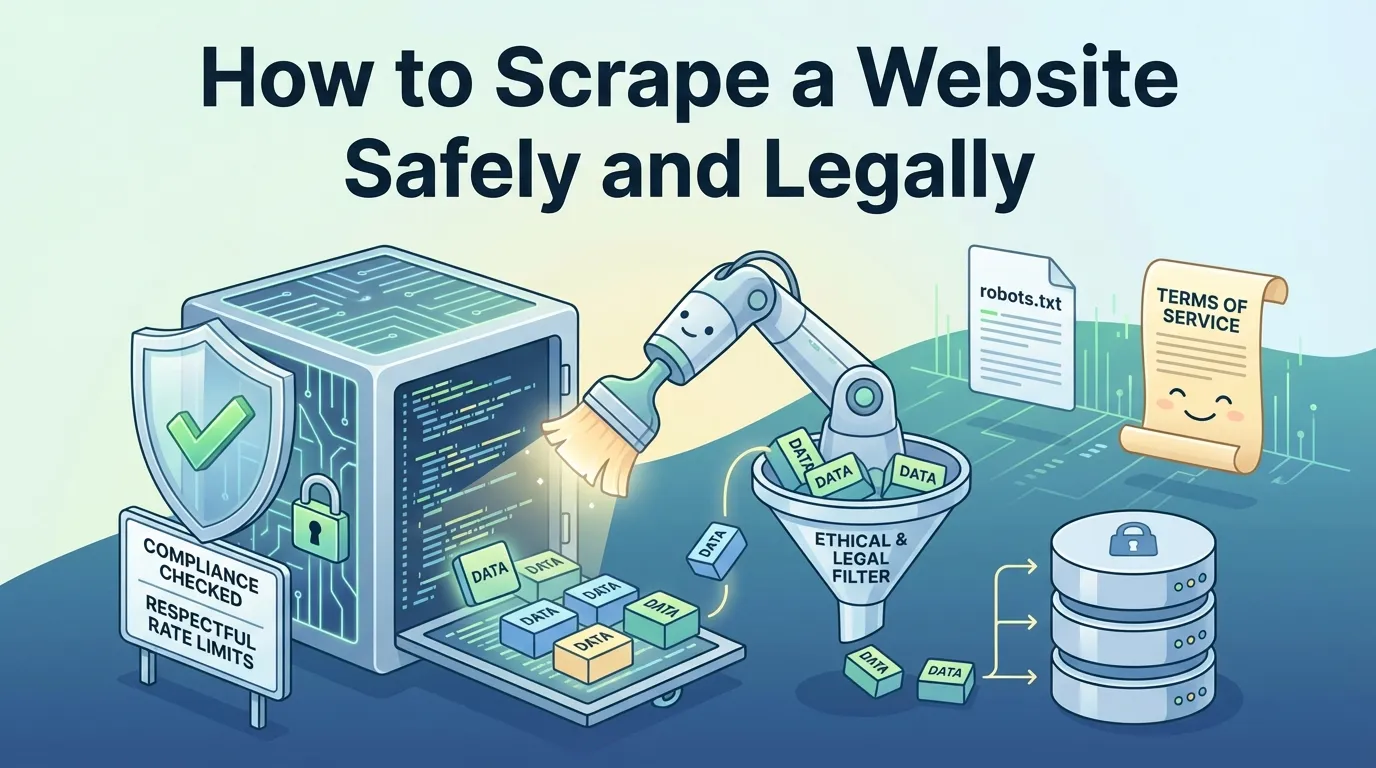
To ensure compliance, always learn how to scrape a website responsibly by respecting website policies, adhering to robots.txt guidelines, and refraining from collecting sensitive information. Practicing ethical web scraping safeguards user privacy and helps you stay aligned with data protection laws.
What is Web Scraping?
Web scraping involves extracting data from websites to gather useful information. It is a structured process that transforms raw website content into organized data you can analyze and use effectively. Let’s break it down into its core components.
The Basics of Web Scraping
Fetching Data: Accessing website content
The first step in web scraping is fetching data from a website. This involves sending a request to the website’s server and retrieving its HTML content. Tools like Python’s Requests library or browser-based solutions such as Selenium can help you access this data efficiently.
Parsing and Formatting: Converting raw data into usable formats
Once you fetch the data, you need to parse it. Parsing involves identifying the specific elements you want, such as product prices, headlines, or contact details. Libraries like BeautifulSoup or Cheerio allow you to extract and format this data into structured formats like tables or lists.
Saving Data: Storing extracted information for analysis
After parsing, you save the data in a format that suits your needs. Common formats include CSV, JSON, or databases like MySQL. This step ensures the data is ready for further analysis or integration into your projects.
Types of Web Scraping
Manual Scraping: When automation isn’t necessary
Manual scraping involves copying and pasting data directly from a website. While this method requires no technical skills, it is time-consuming and prone to errors. Repetitive tasks can slow you down, and the lack of organization makes the data harder to analyze.
Automated Scraping: Using tools and scripts for efficiency
Automated web scraping uses tools or scripts to extract data quickly and accurately. This method is faster and reduces errors compared to manual scraping. Tools like Scrapy and BeautifulSoup are excellent for coding-based projects, while no-code platforms like Octoparse are ideal for non-programmers. For dynamic websites, Selenium is a great choice as it interacts with JavaScript elements seamlessly. Automated scraping boosts productivity and ensures your data is well-organized for analysis.
Is Web Scraping Legal?
Understanding the legal landscape of web scraping is essential to avoid potential disputes. While scraping data can be a powerful tool, you must ensure your actions comply with laws and website policies.
Legal Considerations
Website Terms of Service: Why you must read them
Before scraping any website, review its terms of service. These terms often outline what is permissible and what is not. Ignoring them can lead to serious consequences. For example, in the BrandTotal case, Meta successfully argued that BrandTotal violated its terms by scraping data from Facebook and Instagram. This breach resulted in legal action, emphasizing the enforceability of such agreements. Violating terms of service can also lead to claims like trespass to chattels or unjust enrichment.
Always respect these terms to avoid legal risks.
Copyright and Data Ownership: What you can and cannot scrape
Web scraping may involve copyright issues, especially when copying original content. For instance, in Facebook v. Power Ventures, the court ruled that scraping user profile pages could infringe on Facebook’s copyright. However, not all data is protected. In the hiQ Labs v.
LinkedIn case, the court allowed scraping of publicly available LinkedIn profiles, stating that the Computer Fraud and Abuse Act (CFAA) does not apply to public data.
You should focus on public information and avoid copying proprietary content to stay within legal boundaries.
Ethical Practices
Respecting Website Policies: Avoiding harm to website owners
Ethical web scraping involves respecting the boundaries set by website owners. Following the robots.txt file is a good starting point. This file specifies which parts of a website can be accessed by bots. Ignoring it can overload servers and disrupt operations. Implementing rate limits also helps maintain server stability. These practices ensure your scraping activities do not harm the website.
Avoiding Sensitive Data: What data should not be scraped
You should avoid collecting sensitive or personal data unless you have explicit permission. Focus on publicly accessible information. Regularly inspect your collected data to ensure it does not include unauthorized or private details. Documenting your methods can further demonstrate your commitment to ethical practices. These steps help you comply with privacy regulations and maintain trust.
How to Scrape a Website Safely
Best Practices
Use a Rotating Proxy: Avoid detection and bans
Rotating proxies are essential for effective web scraping. They help you mask your IP address by cycling through a pool of proxies, making it harder for websites to detect and block your activity. You can also simulate legitimate browser behavior by sending appropriate headers and cookies. This reduces the chances of detection.
To handle JavaScript-heavy websites, consider using proxies that support JavaScript rendering. These strategies ensure your scraping efforts remain uninterrupted.
Set Reasonable Request Rates: Prevent overloading servers
Sending too many requests in a short time can overload a website’s server. This not only disrupts the website but also increases the likelihood of your IP being blocked. To avoid this, set a reasonable delay between requests. Tools like Scrapy allow you to configure request rates easily.
Maintaining a steady pace ensures your scraping activities remain unnoticed and ethical.
Identify Yourself: Use proper headers and user agents
Websites often monitor user agents to identify bots. Using a proper user agent string helps you mimic a real browser. Include headers that indicate your scraper’s purpose, such as Accept-Language or Referer. This builds trust and reduces the chances of being flagged.
Always ensure your scraper behaves like a legitimate user to avoid detection.
Common Mistakes to Avoid
Ignoring Robots.txt: Why it’s important to check
The robots.txt file specifies which parts of a website are off-limits to bots. Ignoring this file can lead to legal and ethical issues. Always check the robots.txt file before scraping. Respecting these guidelines not only protects you legally but also ensures you don’t harm the website’s functionality.
Scraping Without Permission: Risks of legal action
Scraping data without permission can lead to lawsuits. Websites often include terms of service that prohibit unauthorized scraping. Violating these terms can result in legal consequences, as seen in cases like BrandTotal v. Meta. Always seek permission or focus on publicly available data to stay compliant.
Potential Challenges
Captchas and Anti-Bot Measures: How to handle them
CAPTCHAs are designed to block bots by requiring human-like behavior. They can slow down your scraping process and increase costs. To overcome this, use CAPTCHA-solving services or tools like Selenium to simulate user interactions.
Avoid triggering CAPTCHAs by maintaining a low request rate and using rotating proxies. These measures help you bypass restrictions effectively.
Dynamic Content: Scraping JavaScript-heavy websites
Dynamic websites load content using JavaScript, making traditional scraping methods ineffective. Tools like Puppeteer and Selenium can simulate user interactions and render JavaScript content. This allows you to extract data accurately.
Monitoring network requests and inspecting the DOM are also effective strategies for handling dynamic content.
Tools and Methods for Web Scraping in 2025
Web scraping has evolved significantly, and in 2025, you have access to a variety of tools and methods to make the process efficient and user-friendly. Whether you prefer no-code platforms, coding frameworks, or APIs, there’s a solution tailored to your needs.
No-Code Tools
Examples: Octoparse, ParseHub
No-code tools simplify web scraping for users without programming skills. Some popular options include:
-
Apify – Offers the largest database of pre-made templates.
-
ParseHub – A reliable veteran in the industry.
-
Simplescraper – Ideal for small-scale scraping with affordable plans.
-
Webautomation.io – Provides over 400 templates and long data retention.
Pros and Cons of No-Code Solutions
|
Advantages |
Disadvantages |
|---|---|
|
Automation |
Limited flexibility for complex tasks |
|
Cost-Effective |
May struggle with website changes |
|
Easy Implementation |
Requires learning the tool’s interface |
|
Low Maintenance |
|
|
Speed |
|
|
Data Accuracy |
|
|
Effective Management of Data |
|
No-code tools are perfect for quick, straightforward scraping tasks. However, they may not handle dynamic websites or advanced requirements effectively.
Coding Frameworks
Python Libraries: BeautifulSoup, Scrapy, Selenium
Python remains a favorite for web scraping due to its robust libraries:
-
Requests – Fetches website content efficiently.
-
BeautifulSoup – Parses HTML and XML documents with ease.
-
lxml – Processes large datasets quickly.
-
Selenium – Interacts with dynamic web pages.
-
Scrapy – A powerful framework for large-scale scraping projects.
JavaScript Tools: Puppeteer, Cheerio
JavaScript tools like Puppeteer and Cheerio are excellent for handling modern websites:
-
Cheerio:
-
Parses HTML into a DOM structure.
-
Uses CSS selectors for element selection.
-
Cannot handle JavaScript-heavy pages.
-
-
Puppeteer:
-
Automates browser interactions in headless mode.
-
Scrapes dynamic content effectively.
-
Lacks support for video playback.
-
These frameworks give you greater control over your scraping process, making them ideal for complex projects.
APIs for Web Scraping
Benefits of APIs: Faster and more reliable data access
APIs offer several advantages over traditional scraping methods:
-
Efficiency and Scalability – Handle large volumes of requests effortlessly.
-
Cost-Effectiveness – Save time and resources with automation.
-
High Success Rate – Achieve up to 90% success in data extraction.
-
Error Reduction – Minimize human errors for accurate results.
-
Consistency – Maintain reliable data collection even with website changes.
Examples: Twitter API, Google Maps API
|
API Name |
Features |
Ease of Use |
Pricing |
|---|---|---|---|
|
Visualping |
Tracks website changes, webhook support |
Easy to use |
Starting at $50/month |
|
OxyLabs |
AI-powered unblocker, 100M+ proxies |
Complex to set up |
Pay per successful result |
|
Apify |
Custom APIs, workflow automation |
Beginner-friendly |
Starting at $49/month |
|
ParseHub |
JavaScript rendering, point-and-click UI |
Great for non-technical users |
Starting at $149/month |
APIs streamline data collection, especially for large-scale projects, and reduce the need for extensive coding.
Step-by-Step Guide: How to Scrape a Website
What You Need
Basic Programming Knowledge: Python as an example
To start scraping, you need basic programming knowledge. Python is an excellent choice due to its simplicity and extensive libraries for web scraping. Familiarize yourself with Python syntax and concepts like loops, functions, and data structures. These skills will help you write efficient scripts for extracting data.
Required Tools: IDE, libraries, and a target website
You’ll need a few essential tools to begin:
-
Beautiful Soup: Parses HTML and XML documents.
-
Scrapy: Handles large-scale scraping projects.
-
Selenium: Interacts with dynamic web pages.
-
Octoparse: A no-code tool for non-programmers.
Choose an IDE like PyCharm or Visual Studio Code to write and test your code. Finally, pick a target website with publicly available data to scrape.
Step-by-Step Instructions
Step 1: Install Necessary Libraries (e.g., BeautifulSoup, Requests)
Install the required libraries using Python’s package manager. For example:
pip install beautifulsoup4 requests
Step 2: Fetch the Website’s HTML Content
Use the Requests library to send a GET request and retrieve the HTML content of your target website. Here’s an example:
import requests
response = requests.get('https://example.com')
html_content = response.text
Step 3: Parse the HTML to Extract Data
Use Beautiful Soup to parse the HTML and extract the desired data. For instance, to extract all headings:
from bs4 import BeautifulSoup
soup = BeautifulSoup(html_content, 'html.parser')
headings = soup.find_all('h1')
Step 4: Save the Data in a Desired Format (e.g., CSV, JSON)
Save the extracted data for analysis. Use Python’s csv or json modules to store the data:
import csv
with open('data.csv', 'w', newline='') as file:
    writer = csv.writer(file)
    writer.writerow(['Heading'])
    for heading in headings:
        writer.writerow([heading.text])
Common Use Cases for Web Scraping
Web scraping has become an essential tool across industries, offering efficient data extraction methods to solve real-world challenges. Let’s get into some of the most common applications.
E-Commerce and Price Monitoring
Tracking Competitor Prices: Staying competitive in the market
In e-commerce, staying ahead often means understanding your competitors’ pricing strategies. Scraping automates the collection of pricing data from competitor websites. This allows you to analyze trends in real time and adjust your prices accordingly. For example, e-commerce giants like Amazon use dynamic pricing, which can change multiple times a day. By monitoring these changes, third-party sellers can refine their strategies and remain competitive.
Continuous data extraction also helps identify underpriced products, giving you an edge in the market.
Gathering Product Data: Building product comparison tools
Scraping product details like descriptions, reviews, and availability enables you to create comparison tools. These tools help customers make informed decisions, improving their shopping experience. Businesses also use this data to understand customer preferences and refine their offerings.
For instance, analyzing customer reviews can reveal trends that guide product development. This approach ensures your business stays responsive to market demands.
Lead Generation and Marketing
Extracting Contact Information: Finding potential clients
Scraping simplifies lead generation by automating the collection of contact details from multiple websites. This method is faster and more accurate than manual data extraction. You can gather qualifying data like company size and job titles to segment leads effectively. However, ensure compliance with regulations like GDPR when collecting email addresses. Ethical practices build trust and protect your reputation.
Analyzing Market Trends: Using data for targeted campaigns
Scraping provides insights into user behavior, competitor strategies, and market trends. This data enhances your marketing campaigns by making them more targeted and effective. For example, analyzing competitor reviews can reveal gaps in their services, helping you attract dissatisfied customers.
Reliable data extraction ensures your campaigns are based on up-to-date information, maximizing their impact.
Academic and Business Research
Collecting Large Datasets: For machine learning and analysis
Researchers rely on scraping to collect large datasets for machine learning and statistical analysis. For example, in healthcare, scraping can help identify behavioral factors linked to diseases or predict treatment outcomes. In environmental studies, it aids in tracking species occurrences and climate changes.
These datasets provide the foundation for groundbreaking discoveries.
Monitoring News and Social Media: Staying updated on trends
Scraping news articles and social media posts keeps you informed about industry trends and public opinions. This data helps businesses adjust their strategies quickly, especially during crises. For instance, analyzing social media trends can guide public relations efforts, turning potential challenges into opportunities for engagement. Organized data extraction ensures you focus on relevant information, saving time and resources.
Web scraping offers a powerful way to gather data, but you must approach it responsibly. Ethical practices include respecting website owners’ rights, adhering to copyright laws, and protecting user privacy. To scrape safely and legally, follow these key steps:
-
Review and comply with website Terms of Service to avoid legal risks.
-
Focus on publicly available data and avoid sensitive or personal information.
-
Use rate limiting and rotating IPs to prevent detection and server overload.
Always respect technical safeguards like robots.txt and apply strong security measures to protect collected data. By following these guidelines, you can explore web scraping tools confidently while staying compliant with laws and maintaining ethical standards.