
You can choose a wordpress directory plugin by focusing on ease of use, essential features, reliable support, and pricing. When you start with wordpress, you want a plugin that works well with your theme and does not require much technical skill. Look for plugins that offer clear instructions and helpful support teams. You should check if the plugin fits your needs and budget.
Many wordpress options make building a directory simple, even for beginners. Now you can learn how to select the right plugin for your wordpress site.
Key Takeaways
-
Identify your needs before choosing a directory plugin. List essential features like user submissions, maps, or payment options.
-
Check for active installations and recent updates. This indicates reliability and ongoing support for the plugin.
-
Read user reviews to uncover potential issues. Pay attention to negative feedback to avoid common pitfalls.
-
Ensure responsive support is available. Quick assistance can save you time and frustration when problems arise.
-
Test the plugin’s performance on a staging site. This helps you avoid slowdowns or conflicts with your existing WordPress setup.
How to Choose a WordPress Directory Plugin
Choosing the right directory plugin for WordPress can feel overwhelming at first. You want a tool that helps you create a business directory without frustration. By focusing on a few key factors, you can make a smart decision and avoid common problems.
Key Criteria for Beginners
When you start searching for a directory plugin, you should pay attention to the essentials. Here are the top five factors you need to consider:
-
Define Needs: Make a list of the features you need. Do you want users to submit listings? Do you need maps or payment options? Knowing your requirements helps you narrow down your choices.
-
Check Vitals: Look for plugins with many active installs and recent updates. This shows that the plugin is reliable and well-maintained.
-
Read Reviews: User feedback can reveal strengths and weaknesses. Pay attention to negative reviews to spot potential issues.
-
Verify Support: Responsive support makes a big difference. Check if the developer answers questions and solves problems quickly.
-
Speed Test: Test your site’s speed before and after installing the directory plugin. A slow site can drive visitors away.
You should also focus on ease of use. Plugins that offer simple installation and clear instructions help you get started faster. Many beginners find that user-friendly plugins encourage them to experiment and improve their sites over time. Compatibility matters as well. You want a directory plugin for WordPress that works smoothly with your theme and other plugins.
Always check for recent updates and active support forums. This ensures you will not run into problems as WordPress evolves.
Common Mistakes to Avoid
Many beginners make similar mistakes when choosing a directory plugin. You can avoid these pitfalls by staying alert to the following issues:
-
Ignoring Compatibility: Some plugins do not work well with certain themes or other plugins. This can cause your site to slow down or break important features.
-
Overlooking Support: If you choose a plugin with poor support, you may struggle to fix problems or get answers to your questions.
-
Skipping Reviews: Not reading user reviews can lead you to pick a plugin with hidden issues.
-
Choosing Based on Features Alone: More features do not always mean better results. Focus on what you need, not just on what looks impressive.
-
Not Testing Performance: Some directory plugins can slow down your site, especially if they use heavy database queries or add unnecessary features.
The table below shows what can happen if you choose an incompatible or unsupported directory plugin for WordPress:
|
Type of Plugin Issue |
Consequence |
|---|---|
|
Plugin incompatibilities |
May introduce features that conflict with existing platform capabilities, leading to performance degradation. |
|
Backup, export, and import plugins |
These plugins may fail to function correctly, resulting in data loss or incomplete backups. |
|
Caching plugins |
Can cause inefficiencies as the platform already has built-in caching mechanisms that are optimized for performance. |
|
SQL query-intensive plugins |
May generate inefficient queries, leading to slow performance, especially on large sites with extensive content or user bases. |
You can avoid these problems by testing plugins on a staging site before using them on your live site. Always check for recent updates and active support channels. This helps you keep your WordPress site running smoothly as you build your directory.
By following these steps, you will find a directory plugin for WordPress that fits your needs and helps you create a business directory with confidence.
What Is a Directory Plugin and Why Use One?
You have learned what to look for when choosing a wordpress directory plugin. Now, you might wonder what a directory plugin actually does and why it matters for your wordpress site.
Simple Definition
A directory plugin is a tool you add to your wordpress site to organize and display listings. You can use it to create business directories, staff directories, or even local event listings. With a directory plugin, you do not need to write code or build complex pages from scratch. You simply install the plugin, set up your categories, and start adding listings. This makes it much easier for you to manage and present information on your wordpress site.
Benefits for Beginners
If you are new to wordpress, building a directory from scratch can feel overwhelming. A directory plugin solves many problems for you. It gives you ready-made features and tools that save you time and effort. You do not need to worry about technical details or custom coding.
Here is a quick look at how a directory plugin helps you as a beginner:
|
Benefit |
Description |
|---|---|
|
Simple directory creation |
Easy setup without coding skills, making it accessible for beginners. |
|
Flexible and customizable |
Allows customization of layout and fields for each listing, catering to specific needs. |
|
Advanced search and filtering |
Offers users the ability to search and filter listings effectively, enhancing user experience. |
|
Payment support |
Enables monetization through payment gateways and subscription plans, beneficial for revenue. |
|
Compatibility |
Works well with other plugins and themes, ensuring a seamless integration into existing setups. |
You can see that a directory plugin for wordpress gives you more than just a list. You get advanced search, payment options, and easy customization. You also avoid common problems like theme conflicts or slow performance. Many directory plugins work well with popular wordpress themes and other plugins, so you do not have to worry about breaking your site.
When you use a directory plugin, you unlock the power of wordpress for building directories. You can focus on growing your site instead of fixing technical issues.
Quick Comparison of the Best WordPress Directory Plugins
Now that you know why a directory plugin is important, you should see how the top options compare. Many wordpress plugins offer similar features, but some stand out for beginners. You want a directory plugin that matches your needs, works well with your wordpress site, and fits your budget.
Comparison Table: Features, Ease of Use, Pricing
You can use the table below to compare the most popular wordpress directory plugins. This table shows their main features, how easy they are to use, and what you can expect to pay.
|
Plugin Name |
Key Features |
Ease of Use |
Pricing |
|---|---|---|---|
|
Connections Business Directory |
Customizable templates, Gutenberg support |
Quick and easy |
Free, no monetization options |
|
Directorist |
Monetization, maps, user dashboard |
Quick setup |
Subscription plans available |
|
uListing |
Front end management, multi-lingual support |
Some setup required |
$49.00 – $149.00 for premium |
|
GeoDirectory |
Map integration, front end editing |
Good core functionality |
Membership $99 – $199 |
You should also look at how many people use these plugins and how they rate them. High active installations and good ratings show that a directory plugin works well for many wordpress users.
|
Plugin Name |
Active Installations |
User Ratings |
|---|---|---|
|
Business Directory Plugin |
4.6 out of 5 |
|
|
Directorist |
20,000 |
4.7 out of 5 |
|
Connections Business Directory |
10,000+ |
401 5-stars |
|
Simple Link Directory |
3,000+ |
101 5-stars |
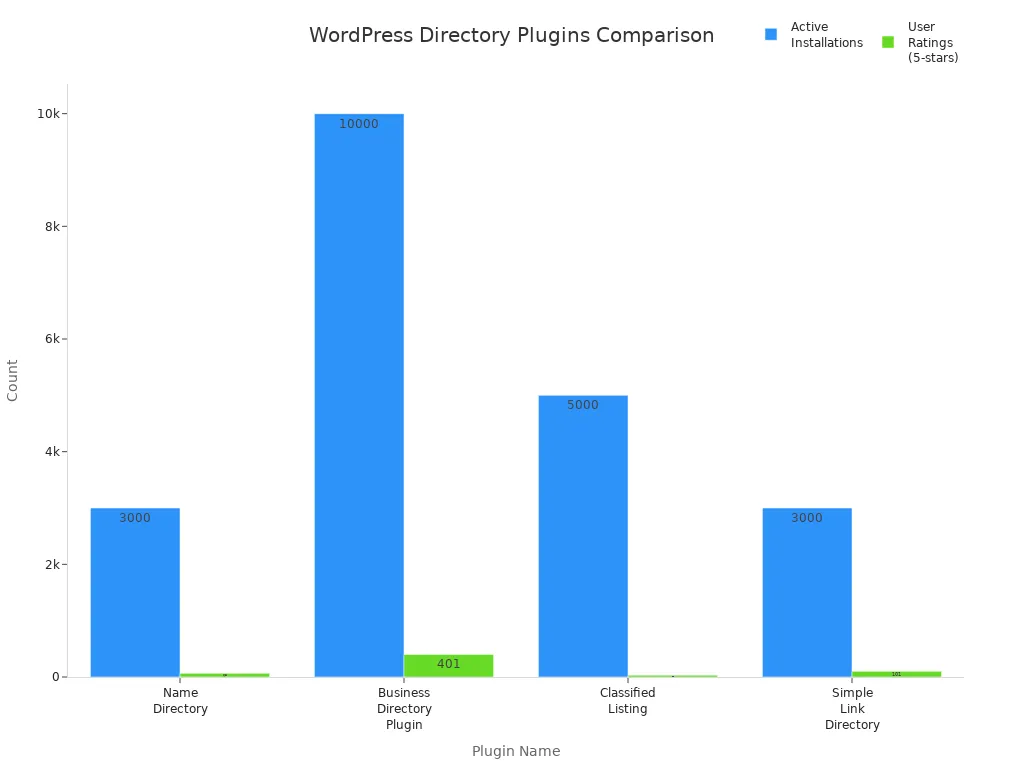
When you compare these wordpress plugins, you see that each directory plugin has strengths. Some focus on easy setup, while others offer more advanced features. You should pick a directory plugin that matches your skill level and your goals for your wordpress site. If you want a free option, Connections Business Directory gives you a simple start.
If you need more features, Directorist or GeoDirectory may fit better. Always check user ratings and active installations before you choose a directory plugin for your wordpress site.
Best WordPress Directory Plugins for Beginners
Now that you have compared the top options, you can explore each directory plugin for WordPress in detail. This section will help you understand what makes each plugin unique and how it can help you create a business directory or manage business listings with ease.
Business Directory Plugin Overview
Business Directory Plugin stands out as one of the most popular choices for beginners who want to create a business directory. You can use this plugin to build business listings, staff directories, or even classified ads. It offers a wide range of features that make managing directory listings simple and efficient.
|
Feature |
Description |
|---|---|
|
Customizable form fields |
You can create tailored forms for listing submissions. |
|
Image upload options |
Drag and drop uploads, image ordering, and thumbnail settings are available. |
|
Payment options |
Accept both paid and free listings, including recurring payments. |
|
Featured listings |
Highlight listings for an extra fee. |
|
Directory management |
Users can edit their listings without accessing the WordPress dashboard. |
|
SEO friendly |
Compatible with popular SEO plugins for better visibility. |
|
Mobile-friendly |
Responsive design for mobile devices. |
|
Multilingual support |
Create directories in multiple languages using WPML. |
You can use Business Directory Plugin to manage business listings without technical skills. The plugin supports both free and paid directory listings, which helps you monetize your directory website.
Business Directory Plugin: Pros and Cons
When you choose a business directory plugin, you should weigh the advantages and disadvantages. Here is a summary based on user reviews:
|
Pros |
Cons |
|---|---|
|
Plenty of options for collecting payments from visitors |
Requires premium add-ons for some features |
|
Ideal for those working under a tight budget |
Requires premium add-on for payment integrations |
|
Offers reCAPTCHA to prevent spam listings |
Tough to scale with this plugin without purchasing an add-on |
|
Mobile-friendly and responsive design |
Unable to edit labels for listings |
|
Compatible with NavXT Breadcrumbs and WP-PageNavi |
Limited customer support options |
You will find that Business Directory Plugin works well for small to medium business directories. If you want advanced features, you may need to purchase add-ons.
GeoDirectory Overview
GeoDirectory is a powerful directory plugin for WordPress that lets you build scalable business listings and directory websites. You can add unlimited listings and manage multiple locations. The plugin uses a modular structure, so you can add features as your directory grows.
-
GeoDirectory offers flexibility and customization.
-
You can design your directory website without being limited by the software.
-
The support team is very helpful, especially for beginners.
-
You can find active community forums and groups for extra help.
GeoDirectory stands out for its ability to handle large directories and its strong integration with other plugins.
GeoDirectory: Pros and Cons
You should consider the main advantages and disadvantages before choosing GeoDirectory for your business directory plugin.
|
Advantages of GeoDirectory |
Disadvantages of GeoDirectory |
|---|---|
|
Premium Features Require Add-Ons |
|
|
Multi-Location Support |
Learning Curve |
|
Advanced Search and Filtering |
Basic Default Styling |
|
Front-End Listing Submission |
Cost for Full Features |
|
Monetization Ready |
|
|
Customizable Layouts |
|
|
Strong Integration |
|
GeoDirectory works best if you want to create a business directory with many listings or need advanced search features. You may need to invest in add-ons for full functionality.
HivePress Overview
HivePress is a lightweight and modern directory plugin for WordPress. You can use it to create a business directory, job board, or service marketplace. HivePress offers pre-built themes and covers various directory types, making it ideal for beginners and developers.
|
Plugin Name |
Price |
Features |
Ideal For |
|---|---|---|---|
|
HivePress |
N/A |
Lightweight, modern, covers various directory types |
Beginners and developers |
You will find HivePress easy to use, with a user-friendly interface and strong support options.
HivePress: Pros and Cons
Here are the main pros and cons of HivePress, based on user feedback:
-
Pros:
-
User-friendly interface
-
High level of customization
-
Strong support options
-
-
Cons:
-
Dependency on WordPress
-
Potential technical challenges for advanced customization
-
Variability in feature scope based on add-ons
-
HivePress works well if you want a flexible directory plugin for WordPress that does not require much setup.
Directorist Overview
Directorist is a feature-rich business directory plugin for WordPress. You can use it to create a business directory, classified ads site, or service listing platform. Directorist offers a user-friendly design, making it ideal for beginners.
|
Feature |
Description |
|---|---|
|
User-Friendly Design |
Ideal for beginners, requiring zero coding skills for operation. |
|
Extensibility |
Compatible with popular page builders like Elementor. |
|
Monetization Capabilities |
Offers features to generate revenue. |
|
Theme Compatibility |
Integrates with various WordPress themes. |
|
Translation Ready |
Easy translation for a global audience. |
|
Custom Fields and Advanced Search Filters |
Tailor your directory to meet specific needs. |
Directorist helps you create a business directory with advanced search and monetization features.
Directorist: Pros and Cons
You should review the main pros and cons before choosing Directorist as your business directory plugin.
|
Pros |
Cons |
|---|---|
|
Free version available |
Free version can be somewhat limiting |
|
|
|
|
You also get themes |
|
|
Packed with features |
|
|
Integrates with popular plugins |
|
|
You can create private directory |
|
|
Advanced form builder |
|
Directorist is a good choice if you want a flexible and extensible directory plugin for WordPress.
Advanced Classifieds & Directory Pro Overview
Advanced Classifieds & Directory Pro is a versatile business directory plugin for WordPress. You can use it to create a business directory, classified ads site, or any type of directory website. The plugin is designed for ease of use and offers many customization options.
|
Feature |
Description |
|---|---|
|
Designed for ease of use, making it accessible for beginners. |
|
|
Extensive customization options |
Offers a variety of customization possibilities. |
|
Versatile directory types |
Supports the creation of various directory types. |
You can tailor your directory listings and business listings to fit your needs with this plugin.
Advanced Classifieds & Directory Pro: Pros and Cons
-
Pros:
-
Easy to use for beginners
-
Highly customizable
-
Supports many directory types
-
-
Cons:
-
Some advanced features may require premium upgrades
-
Interface may feel complex for first-time users
-
Advanced Classifieds & Directory Pro works well if you want to create a business directory with flexible options.
Formidable Forms Overview
Formidable Forms is a form builder that doubles as a directory plugin for WordPress. You can use it to create business listings, staff directories, and user directories without coding skills. The drag-and-drop interface and templates make it easy for beginners.
-
Formidable Forms lets you build forms and databases for directories.
-
You can create business directory listings and advanced search features.
-
Integrations with WooCommerce and Mailchimp add extra value.
You can set up user registration, custom fields, and directory listings pages quickly.
Formidable Forms: Pros and Cons
|
Pros |
Cons |
|---|---|
|
High support renewal costs |
|
|
Offers a variety of add-ons |
Support experience can be lacking |
|
Integrates well with email plugins |
Limited access to premium features after support expires |
Formidable Forms is a good choice if you want to create a business directory and need a simple, flexible tool.
Crocoblock Overview
Crocoblock provides a suite of tools and templates for building a directory website. You can use its templates and JetPlugins to create business listings and directory listings without coding skills.
|
Feature |
Benefit |
|---|---|
|
Templates for directory websites |
Provides at least 40 options for users to select the most suitable one. |
|
Customizable themes |
Edit and adjust themes without losing previous installations. |
|
Specific layouts and components |
Each template is tailored for different purposes, ensuring ease of use for directory creation. |
-
Crocoblock includes 20 JetPlugins, 10+ dynamic templates, and 40+ design templates.
-
You get a free Kava theme and DevTools kit for easy customization.
Crocoblock: Pros and Cons
|
Pros |
Cons |
|---|---|
|
Some plugins only work on specific settings |
|
|
Interactive templates |
Too many components |
|
Numerous plugins and widgets |
Not beginner-friendly |
|
Professional support |
Pricing concerns |
Crocoblock is best if you want a directory website with many design options and interactive features.
Toolset Overview
Toolset is a flexible business directory plugin for WordPress. You can use it to create complex directory websites without advanced coding knowledge. Toolset acts as a functionality builder, making it ideal for beginners who want to create a business directory with custom features.
|
Aspect |
Description |
|---|---|
|
Flexibility |
Allows users to create complex functionalities without coding. |
|
Support |
Exceptional support team assists users. |
|
Functionality Builder |
Ideal for beginners who want to add custom features. |
Toolset supports various post types and fields, so you can manage business listings and directory listings with ease.
Toolset: Pros and Cons
|
Pros |
Cons |
|---|---|
|
Supports various post types and fields for content flexibility. |
Relatively expensive compared to other directory plugins. |
|
User-friendly interface for both beginners and experienced users. |
Steep learning curve for first-time users. |
|
Responsive design for optimal viewing on different devices. |
Limited documentation and guides reported by some users. |
|
Seamless integration with WooCommerce for e-commerce functionalities. |
|
|
Positive customer support experiences reported by users. |
|
|
Free version available for basic features. |
|
Toolset is a strong choice if you want to create a business directory with advanced features and need reliable support.
Directories Pro Overview
Directories Pro is a business directory plugin for WordPress that offers a straightforward installation process. You can upload the plugin, set up your directory name, layout, and payment options with organized settings. Creating categories and business listings is simple, making it a user-friendly choice for beginners.
Directories Pro provides good customization options and regular updates. You can manage directory listings and business listings efficiently.
Directories Pro: Pros and Cons
|
Pros |
Cons |
|---|---|
|
Good customization options |
No AI-powered features |
|
Solid feature set |
Complex setup process |
|
Regular updates |
Limited modern design options |
|
Responsive support team |
Higher learning curve |
|
Good documentation |
Performance issues with large datasets |
Directories Pro is a good fit if you want a directory plugin for WordPress with strong features and support.
Connections Business Directory Overview
Connections Business Directory is a free business directory plugin for WordPress. You can use it to create a business directory or manage business listings without extra costs. The plugin integrates seamlessly with WordPress and works well with existing installations.
|
Advantages |
Disadvantages |
|---|---|
|
The plugin is free, with costs only for extensions. |
Styling Curve: Requires editing PHP/CSS for customization, which may not be beginner-friendly. |
|
Long development history and seamless integration with WordPress. |
Not a complete theme; may require additional themes for a full directory look. |
|
Practical for use with existing WordPress installations. |
|
Connections Business Directory is practical if you want a simple, free solution for business listings.
Connections Business Directory: Pros and Cons
-
Pros:
-
Free to use for basic features
-
Seamless integration with WordPress
-
Good for existing WordPress sites
-
-
Cons:
-
Customization may require editing code
-
Not a complete theme for directory websites
-
You can start with Connections Business Directory if you want to create a business directory without spending money.
By reviewing these best WordPress directory plugins, you can choose the right business directory plugin for your needs. Each directory plugin for WordPress offers unique features, so you can find one that matches your goals for business listings and directory websites.
How to Evaluate and Test Directory Plugins
You have learned about the best directory plugin options for wordpress. Now, you need to know how to test these plugins before you make a final choice. Careful testing helps you avoid problems and pick the right directory plugin for your wordpress site.
Using Free Versions and Demos
Most directory plugin developers offer free versions or demos. You should always try these before you buy or commit. Install the free version on your wordpress site or use a demo site provided by the developer. This lets you see how the directory plugin works with your wordpress setup. You can check if the features match your needs and if the interface feels easy to use. If you run into problems, you can switch to another directory plugin without losing money.
Checking Support and Documentation
Good support and clear documentation make a big difference. Visit the plugin’s support page and look for active responses from the team. Read the documentation to see if it explains how to set up and use the directory plugin. You should also check for video tutorials or community forums. These resources help you solve problems quickly. If you cannot find answers, you may want to try a different directory plugin.
Assessing Theme Compatibility
You want your directory plugin to work well with your wordpress theme. Some plugins may cause layout issues or slow down your site. Test the directory plugin with your current theme. Add a few listings and check how they look on different devices. If you see problems, try switching themes or choose another directory plugin. Always update wordpress and your plugins to keep everything running smoothly.
By following these steps, you can test directory plugins with confidence. Careful testing helps you build a reliable wordpress directory site that meets your needs.
You have learned how to evaluate and test each wordpress directory plugin. Now, you can choose the best wordpress option for your needs. Focus on ease of use, strong support, and essential features when picking a wordpress directory plugin. Try free versions or demos of each wordpress plugin before you decide. Install a wordpress plugin and explore its features on your site. You will see how a good wordpress directory plugin makes building a directory simple.
Start your wordpress directory project today and enjoy the process. With the right wordpress plugin, you can create a great directory site.
FAQ
You may still have questions about WordPress directory plugins. Here are answers to some of the most common ones.
How do I install a WordPress directory plugin?
You can install a plugin by going to your WordPress dashboard. Click “Plugins,” then “Add New.” Search for the plugin name, click “Install Now,” and activate it.
Can I switch directory plugins later?
Yes, you can switch plugins. Export your listings first. Import them into the new plugin. Some plugins offer built-in import tools for easy migration.
Do directory plugins slow down my site?
Some plugins may affect speed. Test your site after installing a plugin. Choose lightweight plugins and keep everything updated for the best performance.
Are free directory plugins good enough for beginners?
Free plugins work well for most beginners. You get basic features and support. Upgrade to a paid version if you need advanced options or more support.